

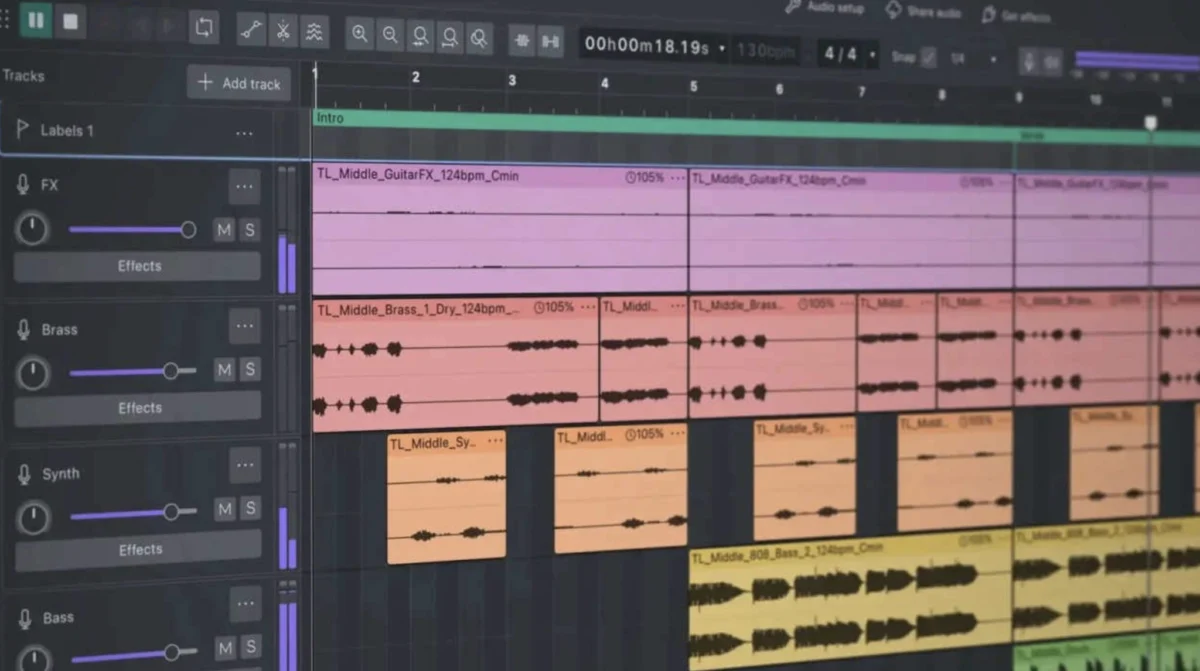
The digital audio workstation (DAW) landscape has been irrevocably altered with the recent launch of Audacity 4, a significant overhaul of the long-standing open-source audio editor. Previously known for its steep learning curve, rudimentary interface, and occasional instability, Audacity 4 has undergone a transformative redesign, earning widespread praise and repositioning itself as a leading contender in the free DAW market, particularly for voice professionals and aspiring audio engineers. This evolution marks a dramatic departure from its predecessors, addressing long-standing criticisms and introducing a suite of features that significantly enhance usability, performance, and visual appeal.
The journey from Audacity 3, a version that garnered considerable ire from its user base, to the highly acclaimed Audacity 4, is a testament to the dedication of its development team and their responsiveness to community feedback. For years, users, particularly those in the voiceover industry, expressed profound dissatisfaction with the software’s clunky interface, its visually unappealing waveform displays, and a notorious tendency to consume excessive hard drive space through inefficient temporary file management. These issues often made precise audio editing a frustrating and time-consuming endeavor, pushing many users to seek out paid alternatives.
A History of Frustration: The Challenges of Previous Audacity Versions
To understand the magnitude of Audacity 4’s achievement, it is crucial to revisit the pain points that characterized its earlier iterations.
Visual Deficiencies and Usability Hurdles
Audacity 3 and its predecessors were widely criticized for their outdated user interface, which many described as resembling software from the mid-1990s. The visual representation of audio waveforms was particularly problematic. Described as "thin, jagged, and low-res," these waveforms made it exceedingly difficult to accurately identify and isolate subtle audio artifacts such as mouth clicks, breaths, or other unwanted noises. This lack of visual clarity transformed intricate editing tasks into a process akin to performing delicate surgery with impaired vision, demanding a level of patience and meticulousness that often proved overwhelming for new users. The visual design was not only functionally hindering but also aesthetically unappealing, contributing to a perception of the software as unprofessional and difficult to engage with.
The Disk Space Black Hole
A recurring and deeply frustrating issue with older Audacity versions was their inefficient handling of project files and temporary data. Users frequently reported that even relatively simple recording sessions, involving short audio clips and minor edits, would result in the software consuming gigabytes of hard drive space. This "disk space black hole" phenomenon was attributed to the unoptimized management of temporary files and project data, leading to significant storage concerns, especially for users with limited hard drive capacity. The unpredictability of this space consumption often left users scrambling to free up disk space, disrupting their workflow and adding an unnecessary layer of stress to the audio production process.
Pervasive Bugs and System Instability
Beyond interface and storage issues, previous versions of Audacity were plagued by a concerning level of instability. Random crashes, data loss, and peculiar audio driver bugs were not uncommon occurrences. For novice voice actors or aspiring audio engineers, setting up a reliable and consistent recording workflow within Audacity 3 was often a recipe for disappointment and technical setbacks. The lack of robust stability meant that critical work could be lost at any moment, undermining user confidence and reinforcing the perception that Audacity was not a dependable tool for professional audio work.
The Audacity 4 Overhaul: A Paradigm Shift in Design and Functionality
The development team behind Audacity 4 has clearly undertaken a comprehensive reimagining of the software, moving beyond superficial fixes to implement fundamental architectural and design changes. This "ground-up" redesign has addressed the core issues that hampered previous versions, ushering in an era of improved performance, enhanced usability, and a significantly more professional user experience.
A Visually Appealing and Ergonomic Interface: The Dawn of Dark Mode
One of the most immediately noticeable and impactful improvements in Audacity 4 is its modern and aesthetically pleasing user interface. The introduction of a Dark Mode option is a particularly welcome feature for professionals who spend extended periods working in dimly lit recording environments. This feature significantly reduces eye strain, allowing for longer, more comfortable editing sessions without the visual fatigue that often accompanied prolonged use of older versions.
Crucially, the visual scaling of audio waveforms has been dramatically enhanced. Waveforms are now rendered with exceptional clarity and crispness, making it substantially easier to identify and address audio imperfections. This improved visual fidelity is paramount for tasks such as de-essing, noise reduction, and precise cut placement, enabling users to achieve a higher degree of polish in their audio productions. The overall design is cleaner, more intuitive, and less visually offensive, transforming the editing experience from a chore into a more engaging process.
Streamlined Usability for Voice Professionals
Navigating Audacity 4 has become significantly more intuitive, particularly for voice actors. While the importance of selecting the correct viewing mode, such as Linear dB, for accurate level and dynamic assessment remains, the process of switching between different views and managing track headers is now seamless. This contrasts sharply with the convoluted and often frustrating experience of manipulating these elements in earlier versions, which often felt akin to solving complex puzzles. The improved workflow allows voice professionals to focus more on their craft and less on wrestling with the software.
Real-Time Dynamics Processing: A Game-Changer for Compression
Perhaps one of the most celebrated advancements in Audacity 4 is the implementation of real-time dynamics processing, most notably for compressors. Previously, applying compression in Audacity was an exercise in educated guesswork. Users would input numerical values, apply the effect, and then analyze the resulting waveform to assess the impact. This iterative and often inefficient process involved frequent undoing and re-tweaking.
Audacity 4 rectifies this by providing a real-time visual feedback loop. Users can now observe and adjust compression curves and gain reduction dynamically as the audio plays. This immediate visual confirmation allows for far more precise and efficient compression settings, empowering users to sculpt the dynamic range of their audio with greater control and accuracy. This feature alone elevates Audacity 4 from a basic editor to a far more capable production tool, aligning it more closely with the capabilities of professional DAWs.
Addressing the Limitations: Where Audacity 4 Still Stands
While Audacity 4 represents a monumental leap forward, it is important to acknowledge that it is not without its limitations. The development team has openly stated that the software does not yet feature a dedicated, destructible waveform editor window in the same vein as some specialized audio editors. Furthermore, while Audacity 4 boasts an impressive array of features, it has not yet reached the comprehensive functionality and extensive plugin support found in industry-standard DAWs like Adobe Audition or Pro Tools.
However, as a multi-track DAW, Audacity 4 now performs exceptionally well. It competently handles audio tracking, non-destructive editing, integration with third-party VST plugins, and the rendering of master files. The fact that it achieves this level of performance and capability while remaining completely free of charge is a remarkable achievement and a significant value proposition for a vast user base.
Implications and the Future of Free DAWs
The successful transformation of Audacity into Audacity 4 has several significant implications for the audio production industry and the open-source software community.
Firstly, it sets a new benchmark for what users can expect from free audio editing software. The dramatic improvement in usability, performance, and visual design challenges the long-held perception that free software is inherently inferior to its paid counterparts. This could lead to a wider adoption of Audacity by individuals and organizations who may have previously been deterred by its past limitations, potentially democratizing audio production even further.
Secondly, the responsiveness of the Audacity development team to user feedback serves as a powerful example of community-driven development. The extensive overhaul directly addresses the pain points articulated by years of user experience, demonstrating the effectiveness of open dialogue between developers and their user base. This collaborative approach is likely to foster continued innovation and user loyalty.
Thirdly, for voiceover artists and aspiring audio engineers, Audacity 4 presents an exceptionally attractive entry point into professional audio work. The ability to access a stable, feature-rich, and aesthetically pleasing DAW at no cost significantly lowers the barrier to entry for those who may not yet have the financial resources for premium software. This can empower a new generation of creators to hone their skills and produce high-quality audio content.
The fact that Audacity 4 can now handle tracking, non-destructive editing, and VST plugin integration with relative ease means that users can build a functional and professional home studio setup without incurring significant software costs. This economic advantage, combined with the software’s newfound robustness, makes it a compelling choice for independent creators, podcasters, audiobook narrators, and burgeoning voice actors.
While Audacity 4 may not yet supplant the most advanced professional DAWs for highly specialized tasks, its current capabilities are more than sufficient for a vast majority of audio production needs, especially within the voiceover realm. The developers have effectively bridged the gap between a basic audio editor and a fully functional DAW, all while maintaining its open-source and free accessibility.
The Verdict: Audacity 4 is Now a Top Recommendation
The transition from the frustrating Audacity 3 to the remarkably capable Audacity 4 is nothing short of a triumph for the open-source community and audio enthusiasts worldwide. For individuals embarking on their journey in voiceover or audio production and lacking the budget for established paid software like Pro Tools, Adobe Audition, or Reaper, Audacity 4 is now the unequivocal recommendation.
The prior sentiment, often expressed by industry professionals, that using Audacity was a compromise born of budgetary constraints, has been decisively overturned. The developers have achieved a remarkable feat, transforming a software that was once a source of considerable user frustration into a polished, efficient, and visually appealing tool.
Audacity 4 is fast, stable, and boasts a modern aesthetic. Crucially, it remains free, making it an accessible and powerful option for creators of all levels. The official endorsement from seasoned professionals now signifies a genuine embrace of the software’s capabilities, encouraging users to download and utilize it without reservation. This evolution ensures that Audacity will continue to play a vital role in democratizing audio production for years to come.
