

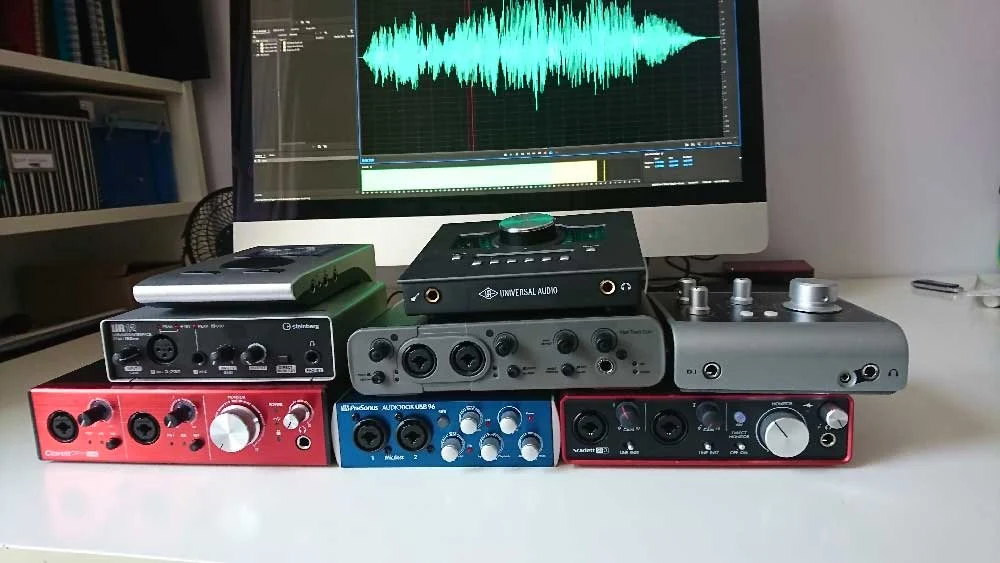
The pursuit of pristine audio quality is paramount for voiceover artists, and at the heart of any professional recording setup lies the audio interface. This crucial piece of hardware acts as the bridge between your microphone’s analog signal and your digital recording environment, profoundly influencing the clarity, richness, and overall fidelity of your vocal performances. This in-depth analysis delves into the intricacies of choosing the right audio interface, exploring key considerations, and examining popular models that cater to the diverse needs of voiceover professionals.
Understanding the Core Function of an Audio Interface
At its most fundamental level, an audio interface is a device that converts analog audio signals into digital data that a computer can process and store, and vice versa. For voiceover work, this typically involves converting the electrical signal from a microphone into a digital format that can be recorded by Digital Audio Workstation (DAW) software. It also handles the conversion of digital audio from your computer back into an analog signal to be sent to your studio monitors or headphones, allowing you to accurately monitor your recordings.
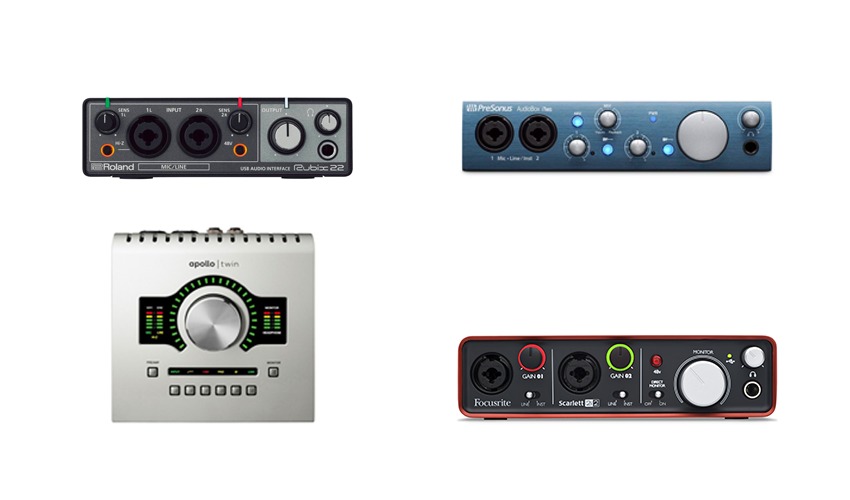
The quality of this conversion process, particularly the preamplifiers that boost the microphone signal, directly impacts the final sound. A high-quality preamplifier will capture the nuances of a voice with minimal noise and distortion, while a lower-quality one might introduce unwanted hiss or alter the natural tone of the voice. Furthermore, the interface’s connectivity, latency (the delay between an input signal and its output), and additional features play significant roles in shaping the recording workflow and the final product.
The Peril of Anecdotal Evidence and the Need for Informed Decision-Making
In the quest for the ideal audio interface, voiceover artists often turn to their peers for recommendations. While this can be a valuable starting point, it’s essential to approach such advice with a critical eye. The audio industry, like many others, can be susceptible to strong personal biases. Enthusiastic users may passionately advocate for their chosen equipment, sometimes overlooking objective performance metrics or the specific needs of others. This can lead to individuals acquiring hardware that, while beloved by its proponent, may not be the best fit for their unique recording environment, technical proficiency, or budget.
The author’s observation highlights a common pitfall: the tendency to conflate personal satisfaction with universal suitability. For audio interfaces, this is particularly relevant as their technical specifications and feature sets can be complex and intimidating for those new to audio production. The goal of this guide is to demystify these complexities and empower voiceover professionals to make informed decisions based on objective criteria and practical considerations, rather than succumbing to the allure of potentially misapplied peer enthusiasm.
Decoding Your Needs: The Foundation of Interface Selection
The journey to selecting an audio interface begins with a thorough self-assessment of your recording requirements. This involves considering not just your current setup but also anticipating future needs and potential growth within your voiceover career.
Quantifying Your Input and Output Requirements
The most immediate consideration is the number of inputs and outputs the interface offers. For a solo voiceover artist primarily recording one microphone at a time, a simple interface with one or two microphone inputs (typically XLR) and a couple of line outputs for monitors might suffice. However, if you anticipate recording multiple voice actors simultaneously, or if your workflow involves integrating external hardware like synthesizers or outboard preamplifiers, you’ll need an interface with a greater number of inputs.
Similarly, the number of outputs is crucial for monitoring. While two main outputs for stereo monitoring are standard, additional outputs can be invaluable for creating separate headphone mixes for clients or co-hosts, or for routing audio to different sets of studio monitors.
Connectivity: Bridging the Gap with Your Computer
The type of connection your audio interface uses to communicate with your computer is a critical factor. The most common connection types include:
- USB (Universal Serial Bus): This is the most prevalent and widely supported connection, offering a good balance of speed and ease of use. USB 2.0 is adequate for many basic setups, while USB 3.0 and higher offer significantly increased bandwidth, crucial for interfaces with a high channel count or for demanding audio tasks.
- Thunderbolt: Offering the highest bandwidth and lowest latency among consumer-grade interfaces, Thunderbolt is ideal for complex professional setups and real-time audio processing. However, it requires a computer with Thunderbolt ports, which are not as universally found as USB ports.
- FireWire: Once a popular choice for audio interfaces, FireWire has largely been superseded by Thunderbolt and faster USB standards. While some older systems may still utilize FireWire, it’s generally not recommended for new purchases.
- Ethernet (AoIP – Audio over IP): While less common for desktop interfaces, AoIP technologies are becoming more prevalent in larger studio setups, offering network-based audio distribution.
It is imperative to ensure compatibility. Purchasing a Thunderbolt interface for a computer without Thunderbolt ports, for instance, would render the purchase useless.
Technological Familiarity and Ease of Use
A crucial, yet often overlooked, aspect is your comfort level with technology. An interface laden with advanced features and complex routing options might seem appealing, but if it overwhelms you, it can hinder your productivity. For beginners or those who prefer a streamlined workflow, simpler, more intuitive interfaces are often the better choice. Conversely, experienced users who require granular control over their audio routing and signal processing will benefit from interfaces with sophisticated software control panels. The adage "if it ain’t broke, don’t fix it" is often best applied to your comfort zone with technology when selecting gear that will be a daily workhorse.
A Sonic Showcase: Evaluating Popular Audio Interfaces
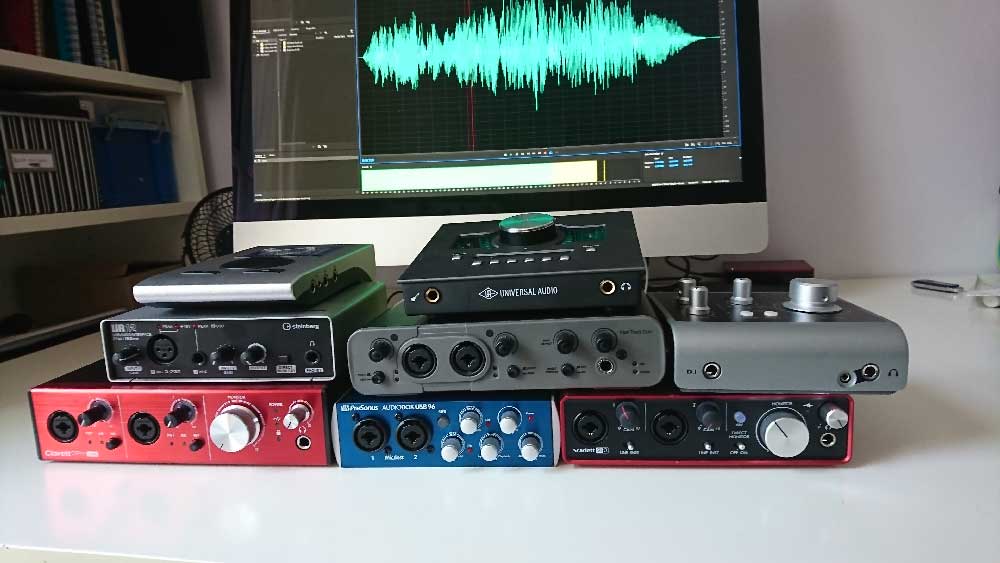
To provide a tangible basis for comparison, this guide examines several currently popular audio interfaces, evaluating their features, price points, and sonic characteristics. Audio samples were recorded using a Sennheiser MK4 microphone connected directly to each interface, employing a consistent signal chain to highlight the inherent sound of the preamplifiers and converters.
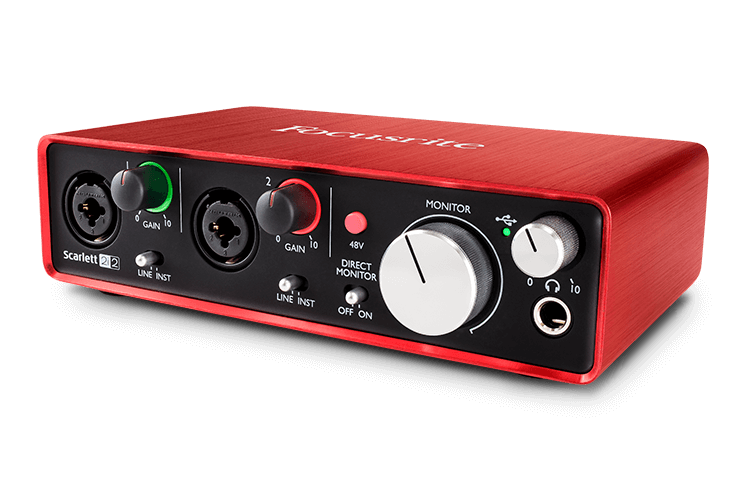
1. Focusrite Scarlett 2i2 (3rd Gen)
- Price: Approximately £115 – $146 USD
- Overview: The Scarlett 2i2 has long been a benchmark for entry-level and intermediate audio interfaces, renowned for its user-friendly design and robust performance. It features two combi-sockets (XLR/TRS) for microphone or line-level inputs, and two line outputs for monitoring. The latest generation boasts improved preamplifiers and converters, offering a cleaner and more detailed sound than its predecessors. It also includes a bundle of free software, often including Pro Tools First and Ableton Live Lite, which can be valuable for beginners. Higher-end Scarlett models, like the 6i6 and above, offer more inputs and outputs and utilize the flexible MixControl software for advanced audio routing.
- Audio Sample: [Link to WAV file]
2. Universal Audio Apollo Twin X
- Price: Approximately £699 – $899 USD
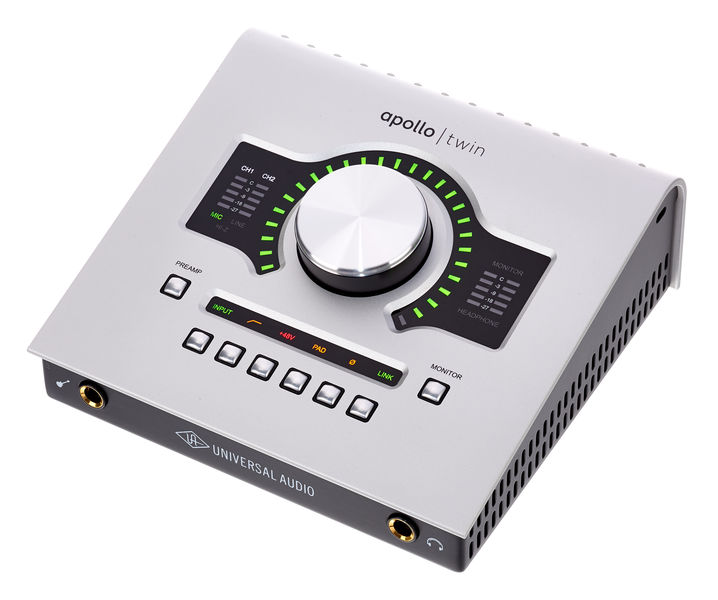
- Overview: The Apollo Twin X is a premium interface favored by many professional voiceover artists, including established figures like Joe Cipriano, Peter Dickson, and Hugh Edwards. It offers 2 inputs and 4 outputs, with the ability to expand via optical connections. Its key differentiator lies in its Unison™ preamplifiers, which can emulate the sonic characteristics of classic analog hardware, and its onboard UAD-2 processing, allowing for near-zero latency tracking with high-quality effects plugins. The Console application provides sophisticated routing and session management, enabling users to save and recall complex setups, which is invaluable for managing diverse client projects. It is available in both Thunderbolt (for Mac and Windows) and USB (for Windows) versions. The ability to save and reload project-specific configurations is a significant workflow advantage.
- Audio Sample: [Link to WAV file]
3. Audient iD4 (MkII)
- Price: Approximately £105 – $199 USD
- Overview: The Audient iD4 is a compact and elegantly designed interface that punches above its weight in terms of audio quality. It features one XLR microphone input and one instrument/line-level jack input. While it offers 2 outputs for monitoring, its flexibility is somewhat limited compared to higher-end models due to its simpler input configuration. However, its preamplifiers are derived from Audient’s larger console designs, providing a clear and detailed sound. The iD4 MkII also includes an array of bundled software, often featuring Cubase LE. Higher models in the iD range, such as the iD14 and iD22, offer more inputs, outputs, and advanced routing capabilities.
- Audio Sample: [Link to WAV file]
4. Avid Fast Track Duo (Discontinued)
- Price: Approximately £145 – $220 USD (when new)
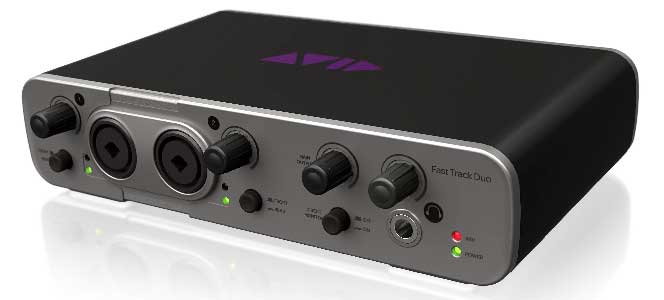
- Overview: Although now discontinued, the Avid Fast Track Duo was a popular choice for its bundled Pro Tools Express software and its straightforward functionality. It featured two combi-sockets for inputs and two line outputs, along with a headphone jack. While tied to the Pro Tools ecosystem, it functioned well as a general-purpose interface with other DAWs. A notable drawback, as pointed out by the original author, was the subtle contrast of its labeling, which could be challenging for some users. Its discontinuation means it is now only available on the used market, presenting a potential option for budget-conscious individuals seeking a capable, albeit older, interface.
- Audio Sample: [Link to WAV file]
5. Focusrite Clarett 2Pre (USB)
- Price: Approximately £345 – $439 USD
- Overview: Positioned as a step up from the Scarlett series, the Clarett range offers enhanced performance and features. The Clarett 2Pre (USB) provides two combi-sockets, two outputs, and is expandable via optical connections. Its USB connectivity leverages modern high-speed data transmission. While sharing a similar hardware layout with the Scarlett series, the Clarett employs different control software and offers superior preamplifiers and converters. The inclusion of Ableton Live Lite, while a valuable DAW, might not be the most preferred for voiceover editing tasks. The Clarett range also includes models with more inputs and outputs for larger studio configurations.
- Audio Sample: [Link to WAV file]
6. PreSonus AudioBox USB 96
- Price: Approximately £99 – $129 USD
- Overview: The PreSonus AudioBox USB 96 is an accessible and reliable interface that comes bundled with a version of PreSonus’s Studio One DAW. It features two combi-sockets for inputs and two outputs, making it suitable for basic recording needs. Unlike some of its more compact counterparts, the AudioBox is not the smallest in its line, but PreSonus offers various packages with different software inclusions. It represents a solid entry-level option for those entering the world of digital audio recording.
- Audio Sample: [Link to WAV file]
7. RME Babyface Pro FS
- Price: Approximately £649 – $759 USD
- Overview: The RME Babyface Pro FS is a compact yet exceptionally powerful interface that belies its minimalist aesthetic. It offers four inputs (two XLR and two jack) and multiple outputs, with expandability via optical connections. Its primary strength lies in its advanced digital routing capabilities, precise clocking, and high-quality converters. While the multi-function buttons and sophisticated software mixer might initially seem complex, once configured, they offer immense flexibility. The ability to save and recall configurations is a significant advantage for professionals working on diverse projects. The Babyface Pro FS is celebrated for its transparency and robust build quality.
- Audio Sample: [Link to WAV file]
8. Steinberg UR12
- Price: Approximately £79 – $99 USD
- Overview: The Steinberg UR12 is a straightforward and budget-friendly interface that offers one XLR microphone input and one 1/4" jack instrument/line input. It comes bundled with Cubase AI and Cubase LE, providing a capable software environment for recording. A notable feature of the UR12, and its larger siblings like the UR22 and UR242, is its ability to loopback audio from your DAW to a remote client, facilitating real-time feedback and collaboration. This makes it a practical choice for voiceover artists who frequently engage with remote directors or clients.
- Audio Sample: [Link to WAV file]
The Verdict: Balancing Budget, Features, and Sonic Integrity
When it comes to selecting an audio interface, the market offers a spectrum of options, each with its unique strengths and price points. While many modern interfaces, particularly in the mid-range and above, deliver impressive audio quality that may be imperceptible to the average listener, there are discernible differences that impact the professional workflow.
Key Differentiating Factors:
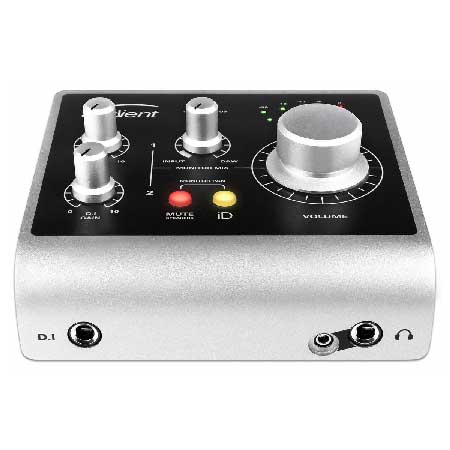
- Rotary Encoders: A common drawback in lower-priced interfaces is the use of "detented" or "notched" rotary encoders. These offer a tactile click at specific increments, allowing for precise recall of settings. Interfaces with smooth, "un-notched" encoders can make it challenging to precisely match previous settings when re-recording pickups or revisiting sessions weeks later. Higher-end interfaces almost universally feature notched encoders for superior control.
- Preamplifier Quality: While many interfaces offer clean amplification, premium models often feature more sophisticated preamplifiers that introduce less noise and distortion, and provide a more nuanced capture of vocal detail.
- Software Integration and Features: Interfaces like the Universal Audio Apollo Twin X and RME Babyface Pro FS stand out for their advanced software control panels, offering robust routing options, plugin integration, and the ability to save and recall complex project setups. This level of customization and workflow efficiency can be a significant time-saver for busy professionals.
The Price-Performance Relationship:
It is undeniable that a correlation exists between price and performance in the audio interface market. Higher-priced units generally offer superior build quality, more advanced features, and demonstrably better sonic performance, particularly in terms of preamplifier quality and converter accuracy. However, the crucial question for voiceover artists is whether these enhancements translate into a perceivable difference for the end client.
For many professional voiceover applications, especially those where the final product is delivered as an audio file for broadcast, advertising, or narration, the nuances captured by a top-tier interface may be subtle. The quality of the microphone, the acoustic treatment of the recording space, and the artist’s performance often play a more significant role in the final outcome.
Recommendation:
For voiceover professionals, a balanced approach is recommended.
- Budget-Conscious: For those starting out or working with a tighter budget, interfaces like the Focusrite Scarlett 2i2 or Steinberg UR12 offer excellent value, providing good sound quality and essential features. The ability to expand with additional inputs or outputs on higher Scarlett models is also a plus.
- Mid-Range Excellence: The Audient iD4 and PreSonus AudioBox USB 96 offer a solid step up in build quality and sonic clarity at a reasonable price point.
- Professional Tier: For those seeking the utmost in sonic fidelity, workflow efficiency, and advanced features, the Universal Audio Apollo Twin X and RME Babyface Pro FS are exceptional choices. Their superior preamplifiers, comprehensive software control, and robust build quality justify their higher cost for professionals who demand the best.
Ultimately, the "best" audio interface is the one that best suits your individual needs, budget, and technical comfort level, while consistently delivering the clear, professional audio required for your voiceover career. It is advisable to listen to audio samples, read detailed reviews, and, if possible, try out interfaces before making a final decision. The investment in the right audio interface is an investment in the quality and success of your voiceover work.
