

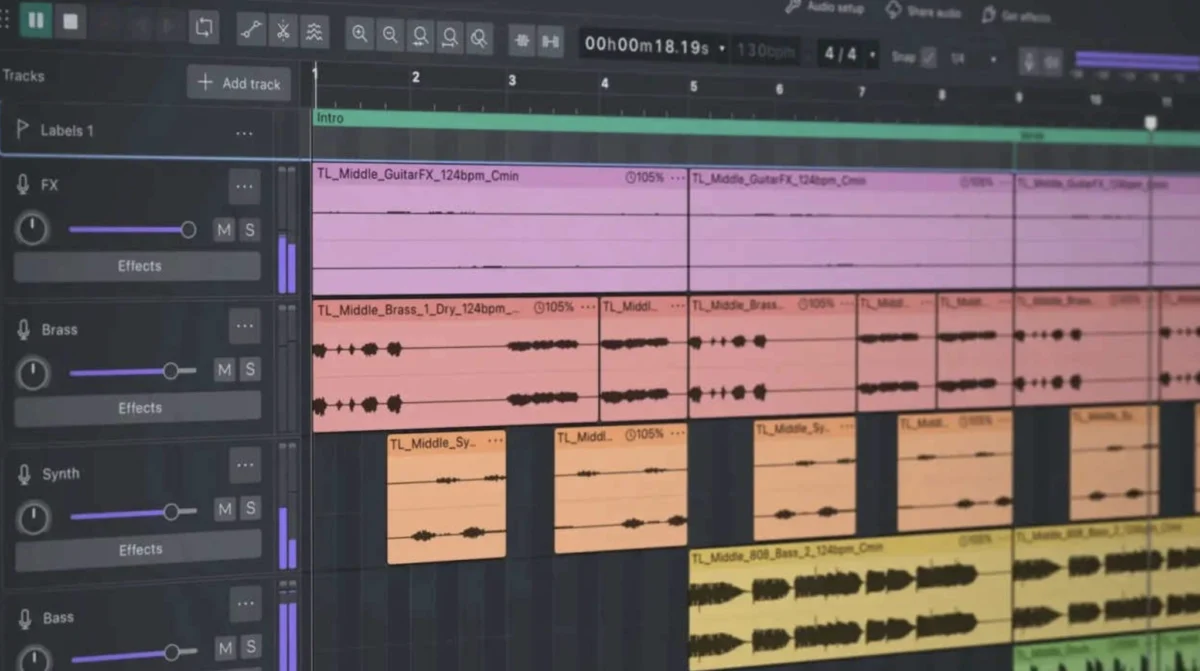
For years, the free Digital Audio Workstation (DAW) Audacity has been a contentious topic within the voiceover and audio production communities. Historically criticized for its clunky interface, frequent bugs, and inefficient resource management, Audacity 3 and its predecessors were widely considered to be more of a hindrance than a help for serious audio work. However, a recent, comprehensive redesign has propelled Audacity into a new era, with version 4 earning widespread praise for its professional capabilities, user-friendly interface, and continued status as a powerful free option for voice actors and audio engineers alike. This transformation represents a significant milestone, potentially democratizing high-quality audio editing for a broader audience.
The Audacity Legacy: From Frustration to Redemption
The historical dissatisfaction with Audacity stemmed from several key areas that significantly impacted user experience and workflow efficiency. For many, the user interface was a primary source of frustration. Described by some as visually "offensive" and "hideous," the older versions of Audacity presented a dated aesthetic that felt more akin to software from the late 1990s rather than a modern production tool. The low-resolution waveforms made it a painstaking process to identify and correct subtle audio imperfections such as mouth clicks, plosives, or breath noises. This lack of visual clarity directly translated into a less precise editing experience, often likened to attempting intricate surgery with inadequate tools.
Beyond the visual challenges, Audacity’s resource management was another significant drawback. Older versions were notorious for their voracious appetite for disk space. Users frequently reported that even simple recording and editing tasks would result in project files ballooning in size, consuming gigabytes of temporary data and unnecessarily occupying valuable hard drive space. This inefficiency was particularly problematic for professionals working with large audio files or on systems with limited storage, leading to frequent warnings of disk space running low and potential data loss.
Furthermore, the stability and reliability of previous Audacity versions were frequently called into question. A litany of bugs, unpredictable crashes, and peculiar audio driver issues plagued users, making it difficult to establish a consistent and dependable recording workflow. For novice voice actors, the learning curve was already steep, and the added complexity of troubleshooting software instability often led to significant frustration and a diminished sense of confidence in their chosen tools. These recurring issues created a perception that Audacity, while free, came with an unacceptably high cost in terms of time, effort, and potential project setbacks.
The Audacity 4 Revolution: A Ground-Up Redesign
The release of Audacity 4 marks a decisive shift, indicating that the development team has moved beyond incremental fixes and embraced a complete architectural overhaul. This strategic decision has resulted in a software package that not only addresses the long-standing criticisms but also introduces features that rival those found in premium DAWs. The most immediately noticeable improvement is the drastically modernized user interface.
A Visually Appealing and Functional Interface
The new interface boasts a clean, contemporary design that significantly enhances usability. A standout feature is the introduction of a highly anticipated "Dark Mode." This addition is particularly beneficial for audio professionals who often spend extended periods working in dimly lit recording environments or studios. The Dark Mode reduces eye strain, allowing for longer, more comfortable editing sessions without the visual fatigue associated with bright, stark interfaces.
Crucially, the visual representation of audio waveforms has been dramatically improved. They are now crisp, clean, and rendered with higher fidelity, making it substantially easier to pinpoint editing errors, such as unwanted noises or inconsistencies in vocal delivery. This enhanced visual feedback is critical for detailed audio manipulation and contributes to a more efficient and accurate editing process.
Enhanced Usability for Voice Actors
Navigation within Audacity 4 has been streamlined, making it considerably more intuitive to manage audio projects. While the developers emphasize the continued importance of selecting the "Linear dB" viewing mode for accurate level and dynamic range assessment by voice actors, the process of switching between different views and managing track headers is now a seamless experience. This contrasts sharply with the convoluted maneuvers previously required, which often felt like solving a complex puzzle. The improved workflow allows voice actors to focus more on their performance and less on wrestling with the software.
Real-Time Dynamics Processing: A Game-Changer
One of the most significant advancements in Audacity 4 is the introduction of real-time dynamics processing, particularly for compressors. Previously, applying compression in Audacity was largely an iterative process of trial and error. Users would input numerical values, apply the effect, analyze the resulting waveform, and often revert to the previous state to make further adjustments. This "blind faith" approach was inefficient and lacked the immediate feedback necessary for effective audio sculpting.
Audacity 4 now provides a real-time visual representation of compression curves and gain reduction as the audio plays. This allows users to see the impact of their compression settings instantly, enabling them to fine-tune parameters with precision and achieve the desired sonic character in real-time. This feature alone elevates Audacity from a basic audio editor to a capable tool for professional audio mixing and mastering.
Addressing Persistent Issues and Future Potential
While Audacity 4 represents a monumental leap forward, it is important to acknowledge that the software is not without its limitations. The article notes that Audacity still lacks a dedicated, destructible waveform editor window, a feature commonly found in specialized waveform editing software. Furthermore, while its feature set is robust, it may not yet fully match the depth and breadth of functionality offered by industry-standard DAWs such as Adobe Audition or Pro Tools.
However, as a multi-track DAW, Audacity 4 has demonstrated surprising proficiency. It handles multitrack recording, non-destructive editing, integration with third-party VST plugins, and the final rendering of master files with considerable ease and stability. The fact that these capabilities are available in a free software package is a significant development for the audio production landscape.
Implications for the Voiceover Industry and Beyond
The transformation of Audacity has profound implications for aspiring and established voice actors, as well as independent audio creators. For individuals just beginning their careers in voiceover who may not yet have the financial resources to invest in premium software like Pro Tools, Adobe Audition, or Reaper, Audacity 4 now presents a viable and highly capable alternative. The previous advice to avoid Audacity at all costs has been definitively reversed, signaling a new era of accessibility for professional-grade audio editing tools.
The developers’ commitment to a complete redesign, addressing long-standing user grievances, is a testament to their dedication to the Audacity community. By delivering a fast, stable, visually modern, and feature-rich free DAW, they have effectively democratized access to advanced audio editing capabilities. This move is likely to empower a new generation of creators to produce high-quality audio content without significant financial barriers. The impact could extend beyond voiceover to podcasters, musicians, and anyone involved in audio production who requires a powerful yet accessible editing suite.
The evolution of Audacity underscores a broader trend in software development where open-source and free solutions are increasingly challenging the dominance of proprietary, high-cost alternatives. As Audacity 4 continues to gain traction and potentially receives further updates and community contributions, its position as a leading free DAW for a wide range of audio applications is likely to be solidified. The journey from a historically maligned tool to a celebrated powerhouse is a remarkable achievement, demonstrating the power of dedicated development and user feedback in shaping the future of digital audio software.
