

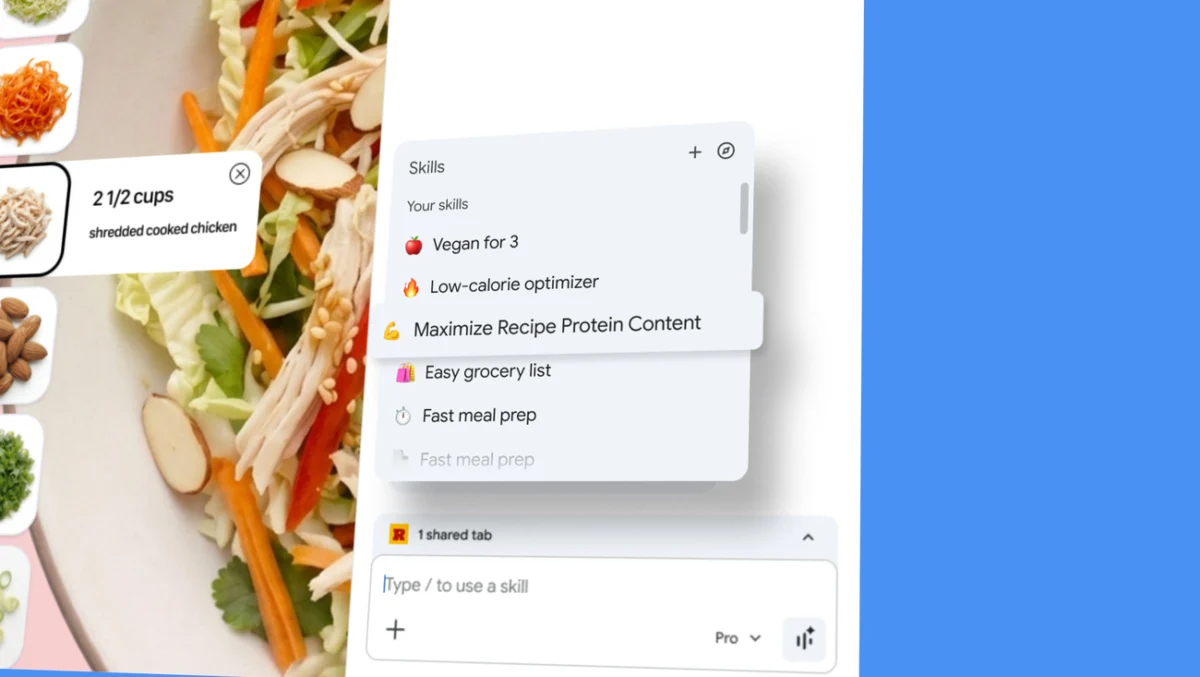
Google has officially announced the launch of "Skills" in Chrome, a transformative feature designed to streamline artificial intelligence workflows by allowing users to save, remix, and execute complex AI prompts with a single click. This update, spearheaded by Hafsah Ismail, Product Manager for Chrome, represents a significant shift in how generative AI is integrated into the browsing experience. By transitioning from a model of repetitive manual input to one of automated "one-click" utility, Google aims to eliminate the friction often associated with prompt engineering and repetitive digital tasks.
The introduction of Skills addresses a growing challenge in the AI landscape: prompt fatigue. As users increasingly rely on AI to summarize articles, compare products, or modify content, the necessity of re-typing or copy-pasting the same instructions across different websites has become a productivity bottleneck. With Skills, Chrome users can now capture successful interactions with Gemini—Google’s flagship AI—and convert them into reusable tools that are accessible directly within the browser’s interface.
The Mechanics of Workflow Automation in Chrome
The functionality of Skills is integrated into the Gemini side panel in Chrome. When a user crafts a prompt that yields high-quality results—such as a request to "analyze this recipe and provide vegan substitutions" or "summarize this technical paper for a non-expert"—they can now save that specific instruction as a "Skill." Once saved, these tools are stored in a personal library, allowing them to be invoked on any webpage without the need for manual re-entry.
To trigger a saved Skill, users simply type a forward slash ( / ) or click the plus sign ( + ) button within the Gemini interface. This action brings up a menu of saved workflows. The AI then applies the pre-defined logic to the content of the current tab, or even multiple selected tabs, providing a contextual and immediate response. This "context-aware" execution is a cornerstone of the new feature, as it allows the AI to ingest the specific data presented on a webpage while following the user’s previously established guidelines.
The system also allows for high levels of customization. Users are not restricted to static prompts; they can edit their saved Skills at any time to refine the output or adapt to changing needs. This flexibility ensures that as a user’s requirements evolve, their AI toolkit evolves alongside them.
A Pre-Configured Library for Immediate Utility
Recognizing that not all users are expert prompt engineers, Google is also launching a curated "Skills Library." This repository contains a variety of ready-to-use workflows designed for common web-based tasks. These pre-built Skills serve as both a functional starting point for new users and a template for more advanced customization.

Key examples of the Skills included in the initial library launch include:
- Product Ingredient Analysis: A tool that breaks down complex ingredient lists on e-commerce sites, explaining the purpose and safety of various chemicals or components.
- Gift Selection and Comparison: A workflow that cross-references product options across multiple tabs against a specific budget and a recipient’s interests, providing a ranked list of recommendations.
- Content Synthesis: Tools designed to extract specific data points from long-form articles, such as key dates, names, or actionable insights.
Users can browse this library, add interesting Skills to their personal collection, and then modify the underlying prompts to better suit their specific voice or requirements. This "remixable" nature of the Skills library highlights Google’s strategy of democratizing AI utility through low-code or no-code solutions.
Chronology of Google’s AI Integration in Chrome
The launch of Skills is the latest milestone in a rapid series of AI-focused updates for the Chrome browser. To understand the significance of this development, it is necessary to look at the timeline of Google’s browser-based AI evolution:
- Early 2023: Google began experimenting with basic generative features, primarily focused on search enhancement and experimental laboratory features (Search Generative Experience).
- Late 2023: The introduction of the "Help me write" feature in Chrome, which utilized AI to assist users in drafting emails, reviews, and forum posts directly within text fields.
- February 2024: Google rebranded its AI efforts under the "Gemini" umbrella and integrated the Gemini side panel into the Chrome desktop browser, providing a persistent AI assistant.
- Mid-2024: The rollout of "Tab Organizer" and AI-generated themes, which used machine learning to categorize browsing sessions and personalize the visual interface.
- April 2024 (Present): The launch of Skills, moving the browser from a reactive AI assistant to a proactive, tool-based productivity environment.
This chronology demonstrates a clear trajectory: Google is moving beyond simple chatbots toward "agentic" AI—tools that can perform specific functions and navigate complex tasks with minimal human intervention.
Supporting Data: The Rise of AI Productivity and Browser Dominance
The strategic importance of Skills is underscored by current market data regarding browser usage and AI adoption. As of early 2024, Google Chrome maintains a commanding lead in the global browser market, with approximately 65% market share across all platforms. By embedding sophisticated AI tools directly into this dominant platform, Google is positioned to set the standard for how the general public interacts with generative technology.
Furthermore, industry reports from McKinsey and Gartner suggest that AI-driven automation could increase global productivity by the equivalent of trillions of dollars annually. Specifically, "knowledge workers" spend an estimated 20% to 30% of their day on repetitive data retrieval and synthesis tasks—exactly the type of workflows that Chrome Skills are designed to automate.
Internal testing by Google during the early access phase of Skills indicated that users were able to complete complex research tasks up to 40% faster when utilizing saved workflows compared to manual prompt entry. This data suggests that even marginal gains in prompt efficiency can lead to significant cumulative time savings for professional and casual users alike.

Security, Privacy, and User Control
One of the primary concerns regarding AI automation is the handling of sensitive data and the potential for "hallucinations" or unintended actions. Google has addressed these concerns by building Skills on Chrome’s existing foundation of security and privacy.
The feature incorporates several layers of protection:
- Confirmation Prompts: For any Skill that involves taking an external action—such as adding an event to a Google Calendar or drafting an email—the system requires explicit user confirmation before proceeding. This prevents the AI from making autonomous commitments without oversight.
- Automated Red-Teaming: Google utilizes continuous "red-teaming" (simulated attacks and stress tests) to identify and mitigate potential vulnerabilities in how Skills interact with web content.
- Privacy Guardrails: The prompts used in Skills benefit from the same layered protections applied to Gemini in Chrome. Data processed through Skills is subject to Google’s standard AI privacy commitments, ensuring that sensitive information is handled according to enterprise-grade security protocols.
- Transparency: Users have full visibility into their saved Skills and can manage or delete them at any time via the "compass" icon within the Gemini interface.
Broader Impact and Market Implications
The introduction of Skills in Chrome is likely to have a ripple effect across the tech industry. For developers of browser extensions, this move represents a significant competitive challenge. Many existing extensions that offer "one-click" AI summaries or specialized web tools may find their utility superseded by Chrome’s native, customizable Skills.
From a strategic standpoint, this update strengthens Google’s ecosystem lock-in. By allowing users to build a personalized library of AI tools that sync across any signed-in Chrome desktop device, Google makes the cost of switching to a competitor—such as Microsoft Edge or Apple’s Safari—significantly higher.
Furthermore, this development signals a shift in the "No-Code" movement. Previously, creating a custom digital tool required at least some knowledge of automation software or scripting. Now, anyone who can write a clear instruction in English can effectively build a "mini-app" that lives inside their browser. This empowers non-technical users to create bespoke solutions for their specific professional or personal needs.
Conclusion and Availability
Starting today, Google is rolling out Skills to Gemini in Chrome for desktop users. The feature is available on any signed-in Chrome device, ensuring that a user’s personalized AI toolkit follows them from their office computer to their personal laptop.
As AI continues to move from a novel curiosity to an essential utility, features like Skills will likely become the standard interface for digital navigation. By focusing on repeatability, customization, and security, Google is not just adding a feature to a browser; it is redefining the browser as a personalized operating system for the AI era. Users can begin exploring the new functionality by opening the Gemini side panel in the latest version of Chrome and experimenting with the "save" functionality or the pre-built library.
